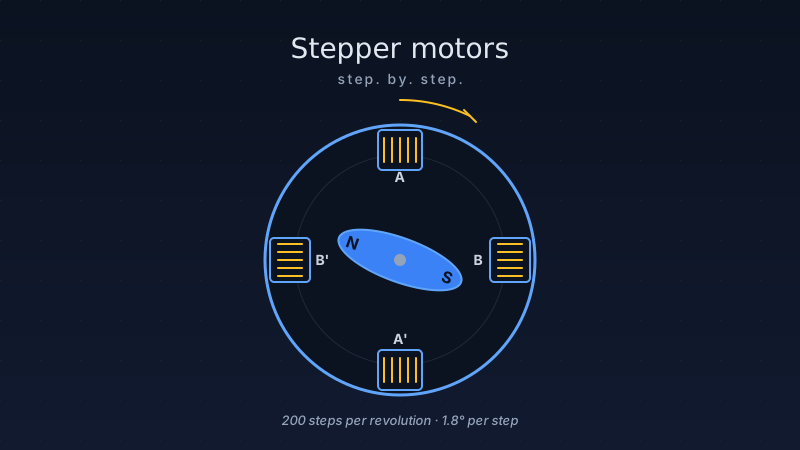
Walk up to any 3D printer, desktop CNC machine, or camera slider and you’ll find stepper motors doing the precision movement work. Unlike regular DC motors that just spin freely, stepper motors move in exact, repeatable increments — no encoder needed. Tell it to move 200 steps, and it moves exactly 200 steps. That guarantee of position is why they’re so popular in maker projects.
The trade-off? They need a bit more wiring and a driver chip to function. This guide takes you from zero to confidently running a stepper motor with an Arduino — covering the theory, the driver options, microstepping, and the mistakes that catch most beginners.
1. How stepper motors work
A stepper motor is a brushless DC motor whose shaft rotates in fixed, discrete steps rather than spinning continuously. Each step is triggered by energising a different set of coils (phases) inside the motor in a specific sequence.
Think of it like a clock hand being clicked forward one position at a time, except you control each click electronically. The rotor — which contains permanent magnets — aligns itself with the magnetic field created by the energised coils. Changing which coils are energised makes the rotor jump to the next position.
Most makers use motors with a 1.8° step angle, which means the motor takes 200 steps to complete one full rotation (360° ÷ 1.8° = 200). Some motors have a 0.9° step angle (400 steps/rev) for finer positioning.
2. Bipolar vs unipolar — which do you have?
Stepper motors come in two main electrical configurations. You need to know which you have because they require different drivers.
| Feature | Bipolar (4-wire) | Unipolar (5 or 6-wire) |
|---|---|---|
| Wire count | 4 wires (2 coils) | 5 or 6 wires (centre-tap) |
| Driver needed | H-bridge driver (A4988, DRV8825) | Darlington array (ULN2003) or H-bridge |
| Torque | Higher (uses full coil) | Lower (uses half coil at a time) |
| Complexity | Requires current reversal — driver handles it | Simpler driver — only needs to switch on/off |
| Common examples | NEMA 17 (most 3D printer motors) | 28BYJ-48 (cheap kit motor) |
| Typical price | $5–$30 | $1–$3 |
3. NEMA frame sizes — picking the right motor
NEMA (National Electrical Manufacturers Association) defines standard motor face sizes. The number after NEMA is the face size in tenths of an inch — so NEMA 17 has a 1.7-inch face. For makers, three sizes matter:
| Size | Face | Typical torque | Best for |
|---|---|---|---|
| NEMA 8 | 20 mm | ~50 mN·m | Tiny robots, camera gimbals |
| NEMA 17 (most popular) | 42 mm | 40–60 N·cm | 3D printers, CNC, camera sliders |
| NEMA 23 | 57 mm | 1–3 N·m | Heavy CNC routers, laser cutters |
NEMA 17 is the maker’s workhorse. It provides enough torque for most projects, runs well on 12 V, and costs $5–$15. Start here unless you have a specific reason not to.
4. Driver chips — the brains behind the motor
A stepper motor driver is a chip that handles the high-current coil switching so your microcontroller doesn’t have to. It translates simple STEP/DIR signals from the Arduino into the precise coil energisation sequence the motor needs.
| Driver | Max current | Microstepping | Interface | Best for | Price |
|---|---|---|---|---|---|
| ULN2003 | 500 mA/channel | No (full/half step only) | 4 GPIO pins | 28BYJ-48 unipolar | ~$0.50 |
| A4988 | 2 A (2.5 A peak) | Up to 1/16 step | STEP + DIR pins | NEMA 17, beginner CNC | ~$1.50 |
| DRV8825 | 2.5 A (2.8 A peak) | Up to 1/32 step | STEP + DIR pins | NEMA 17/23, 3D printers | ~$2.00 |
| TMC2209 | 2 A RMS (2.8 A peak) | Up to 1/256 step | STEP + DIR + UART | Silent 3D printers, robotics | ~$5–$10 |
| TB6600 | 4 A (4.5 A peak) | Up to 1/16 step | STEP + DIR + ENA | NEMA 23, heavy CNC | ~$8–$15 |
5. Microstepping — smoother motion, better precision
Microstepping is a technique where the driver applies proportional currents to both coils simultaneously, positioning the rotor between full steps. Instead of 200 steps per revolution, you can get 3,200 (1/16 step) or even 51,200 (1/256 step) positions per revolution.
Microstepping reduces vibration and noise dramatically but does NOT proportionally increase torque precision at each micro-step — the motor still has a preferred “holding” position at each full step. Use microstepping for smooth motion, not for increasing true positional accuracy under load.
| Mode | Steps/revolution | A4988 pins (MS1/MS2/MS3) | Use when |
|---|---|---|---|
| Full step | 200 | L / L / L | Max torque needed, low speed |
| Half step | 400 | H / L / L | Slightly smoother, less vibration |
| 1/4 step | 800 | L / H / L | Good balance for most projects |
| 1/8 step | 1,600 | H / H / L | Camera sliders, smooth plotters |
| 1/16 step | 3,200 | H / H / H | 3D printers, near-silent motion |
6. Wiring a NEMA 17 with an A4988 driver
The A4988 uses a STEP/DIR interface — one pulse on the STEP pin moves the motor one step, and the DIR pin controls direction. This makes the Arduino code very simple.
| Arduino pin | A4988 pin | Notes |
|---|---|---|
| D2 | STEP | One pulse = one (micro)step |
| D3 | DIR | HIGH = one direction, LOW = the other |
| D4 (optional) | ENABLE | LOW = enabled, HIGH = disabled |
| 5 V | VDD | Logic supply |
| GND | GND | Common ground (logic + motor) |
| 12–24 V supply | VMOT | Motor power; add 100 µF cap to GND |
| Motor coils | 1A/1B, 2A/2B | A1/A2 = coil A; B1/B2 = coil B |
7. Arduino code — basic step/dir control
Here are two examples: a simple manual implementation first, then the more powerful AccelStepper library which handles acceleration and deceleration automatically.
Example 1: basic step/dir (no library)
/*
 * Stepper Motor — Basic Step/Dir Control
 * Driver: A4988 (or DRV8825)
 * Wiring: STEP → D2, DIR → D3, ENABLE → D4 (optional)
 * Motor supply: 12 V to VMOT, logic supply: 5 V to VDD
 * Set VREF current limit BEFORE running!
 */
const int STEP_PIN = 2;
const int DIR_PIN  = 3;
const int ENA_PIN  = 4;   // LOW = enabled, HIGH = disabled

// Motor config
const int STEPS_PER_REV = 200;   // 1.8° step angle = 200 steps/rev
const int MICROSTEPS    = 16;    // match your MS1/MS2/MS3 jumper setting

void setup() {
    pinMode(STEP_PIN, OUTPUT);
    pinMode(DIR_PIN,  OUTPUT);
    pinMode(ENA_PIN,  OUTPUT);

    digitalWrite(ENA_PIN, LOW);   // enable driver
    Serial.begin(115200);
    Serial.println("Stepper ready");
}

void loop() {
    // Rotate one full revolution clockwise
    digitalWrite(DIR_PIN, HIGH);
    stepMotor(STEPS_PER_REV * MICROSTEPS, 800);   // 800 µs step delay

    delay(500);

    // Rotate one full revolution counter-clockwise
    digitalWrite(DIR_PIN, LOW);
    stepMotor(STEPS_PER_REV * MICROSTEPS, 800);

    delay(500);
}

// Send 'count' step pulses with 'stepDelay' microseconds between them
void stepMotor(long count, int stepDelay) {
    for (long i = 0; i < count; i++) {
        digitalWrite(STEP_PIN, HIGH);
        delayMicroseconds(stepDelay);
        digitalWrite(STEP_PIN, LOW);
        delayMicroseconds(stepDelay);
    }
}
Example 2: AccelStepper library — smooth acceleration
/*
 * Stepper Motor — AccelStepper library
 * Install via: Sketch → Include Library → Manage Libraries → "AccelStepper"
 * Wiring: same as Example 1
 *
 * AccelStepper handles ramping up and down automatically,
 * which prevents skipped steps at high speeds.
 */

#include <AccelStepper.h>

const int STEP_PIN = 2;
const int DIR_PIN  = 3;

// DRIVER interface: 1 = step + dir, the standard for A4988 / DRV8825
AccelStepper stepper(AccelStepper::DRIVER, STEP_PIN, DIR_PIN);

const int MICROSTEPS    = 16;
const int STEPS_PER_REV = 200 * MICROSTEPS;   // 3200 at 1/16 step

void setup() {
    Serial.begin(115200);
    stepper.setMaxSpeed(3000);        // steps per second (tune for your motor)
    stepper.setAcceleration(1500);    // steps per second²
    stepper.setCurrentPosition(0);
}

void loop() {
    // Move 5 full revolutions clockwise, then 5 back
    stepper.moveTo(STEPS_PER_REV * 5);
    while (stepper.distanceToGo() != 0) {
        stepper.run();                // must be called in a tight loop — no delay()!
    }
    delay(300);

    stepper.moveTo(0);
    while (stepper.distanceToGo() != 0) {
        stepper.run();
    }
    delay(300);
}

/*
 * TIP: For real projects, use stepper.run() in the main loop
 * and set new targets from sensors or serial commands —
 * never block with while() if you need to read inputs simultaneously.
 */
Example 3: 28BYJ-48 with ULN2003 (half-step mode)
/*
 * 28BYJ-48 Unipolar Stepper with ULN2003 Driver Board
 * Wiring: IN1→D8, IN2→D9, IN3→D10, IN4→D11
 * The 28BYJ-48 has 4096 half-steps per revolution (with gear reduction)
 */

#include <Stepper.h>

const int STEPS_PER_REV = 2048;   // half-step with gear ratio ≈ 2048

// Pin order matches the ULN2003 half-step sequence: 1,3,2,4
Stepper myStepper(STEPS_PER_REV, 8, 10, 9, 11);

void setup() {
    myStepper.setSpeed(12);   // RPM — keep low for 28BYJ-48 (max ~15 RPM)
    Serial.begin(115200);
}

void loop() {
    Serial.println("Clockwise one revolution");
    myStepper.step(STEPS_PER_REV);    // positive = clockwise
    delay(500);

    Serial.println("Counter-clockwise one revolution");
    myStepper.step(-STEPS_PER_REV);   // negative = counter-clockwise
    delay(500);
}
8. Real-world applications
9. Common mistakes & troubleshooting
Stepper motor key takeaways:
- Stepper motors move in exact steps — 200 steps/rev for a 1.8° motor, no encoder needed.
- 4-wire = bipolar (use A4988/DRV8825); 5/6-wire = unipolar (use ULN2003 or ignore centre tap).
- NEMA 17 is the sweet spot for most maker projects — good torque, widely available, well-documented.
- Always set the VREF current limit before connecting your motor. This is the #1 beginner mistake.
- Microstepping makes motion smoother but doesn’t significantly increase true positional accuracy under load.
- AccelStepper library handles acceleration/deceleration automatically — use it for any real project.
- Never disconnect the motor while powered — the voltage spike will kill the driver instantly.
- Add a 100 µF capacitor across VMOT and GND to protect against coil-switching spikes.