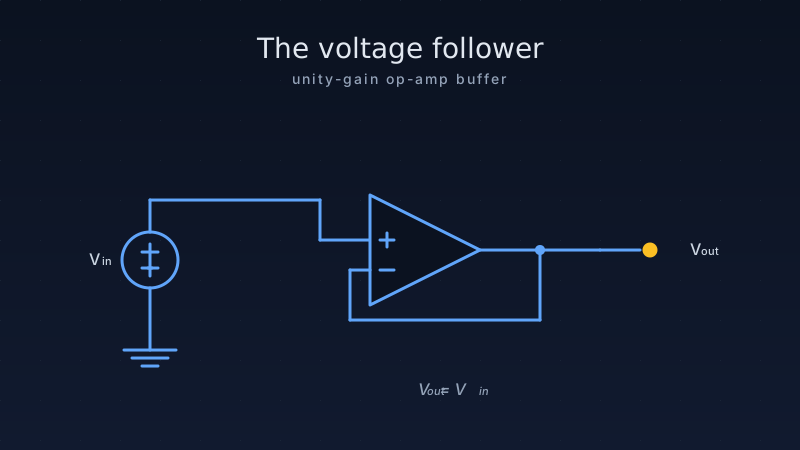
You wire up a sensor, read the voltage with your Arduino, and the number is completely wrong. You double-check your wiring. Everything looks fine. What happened? Chances are, your circuit has an impedance mismatch problem — and the fix is one of the simplest, most useful circuits in all of electronics: the voltage follower, also called a buffer.
A voltage follower copies a voltage from one part of your circuit to another without stealing current from the source. It is the electronic equivalent of looking at a thermometer without touching the mercury — you get the reading without disturbing it.
1. The impedance problem — why you need a buffer
Imagine trying to fill a swimming pool using a garden hose. The hose delivers water just fine. Now imagine someone connects a fire-truck pump to the same garden hose to suck water out faster than the hose can supply it. The pressure drops to almost nothing. That is exactly what happens when a high-impedance source (like a sensor or a voltage divider) tries to drive a low-impedance load (like an Arduino ADC pin or a speaker).
Impedance is a measure of how much a component resists the flow of current. A source with high output impedance can only supply a tiny amount of current. If the load demands more current than the source can provide, the voltage sags — and your reading becomes inaccurate.
When do you need a buffer?
- High-impedance sensors — piezoelectric pickups, pH probes, capacitive touch sensors
- Voltage dividers — any resistive divider feeding an ADC, especially with resistors above 10 kΩ
- Signal-conditioning chains — between filter stages where loading would change the filter response
- Reference voltages — sharing one reference across multiple loads without sagging
- Audio circuits — between a guitar pickup and an amplifier input
2. How a voltage follower works
A voltage follower is an op-amp (operational amplifier) wired in the simplest possible configuration: the output is connected directly back to the inverting (−) input, and the signal you want to copy goes into the non-inverting (+) input.
Here is the key insight: the op-amp will do whatever it takes to make its two inputs equal. Since the output is wired to the − input, the op-amp drives its output to match the + input. The result? Vout = Vin. The output voltage is an exact copy of the input voltage.
Why not just connect a wire?
A wire copies the voltage too, but it also connects the source directly to the load. The load’s current demand flows back through the source, pulling the voltage down. The op-amp buffer isolates the source from the load. It has:
- Very high input impedance (10 MΩ to 1 TΩ) — draws almost zero current from the source
- Very low output impedance (typically <1 Ω) — can supply current to the load without voltage drop
- Unity gain — output equals input (gain = 1)
The math (simple version)
For a non-inverting amplifier, the gain formula is:
In a voltage follower, Rf = 0 (a direct wire) and Ri = ∞ (no resistor at all), so:
3. Choosing an op-amp for your buffer
Not all op-amps are created equal. The right choice depends on your supply voltage, signal frequency, and whether you need the output to reach 0 V (ground).
| Op-amp | Supply | Rail-to-rail | Input type | Bandwidth | Best for |
|---|---|---|---|---|---|
| LM358 | 3–32 V | Output only (to GND) | Bipolar | 1 MHz | General purpose, DC signals, cheapest |
| TL072 | ±6–18 V | No | JFET | 3 MHz | Audio, higher-impedance sources |
| MCP6002 | 1.8–6 V | Yes (in & out) | CMOS | 1 MHz | 3.3 V / 5 V single-supply, battery |
| OPA2340 | 2.7–5.5 V | Yes (in & out) | CMOS | 5.5 MHz | Precision ADC buffering, low noise |
| LM324 | 3–32 V | Output only (to GND) | Bipolar | 1 MHz | Quad op-amp, multiple buffers in one chip |
| NE5532 | ±5–15 V | No | Bipolar | 10 MHz | Audio preamps, low-noise applications |
JFET vs CMOS vs bipolar input
The op-amp’s input stage determines how much current it steals from your source:
- Bipolar (LM358, NE5532) — input bias current around 20–200 nA. Fine for sources below 100 kΩ.
- JFET (TL072) — input bias current around 20–200 pA. Good for sources up to 10 MΩ.
- CMOS (MCP6002, OPA2340) — input bias current around 1 pA. Essential for extremely high-impedance sources like pH probes or piezo sensors.
4. Building a voltage follower on a breadboard
Let’s build a practical buffer using the LM358 — the most common and cheapest op-amp available. It comes in a DIP-8 package with two independent op-amps inside.
LM358 pinout
| Pin | Function |
|---|---|
| 1 | OUT_A |
| 2 | −IN_A (inverting input A) |
| 3 | +IN_A (non-inverting input A) |
| 4 | GND |
| 5 | +IN_B |
| 6 | −IN_B |
| 7 | OUT_B |
| 8 | VCC |
Wiring (single buffer using op-amp A)
- Voltage divider output → pin 3 (+IN_A)
- Pin 1 (OUT_A) tied directly to pin 2 (−IN_A) — this is the feedback wire
- Pin 1 (OUT_A) → Arduino A0
- Pin 8 → +5 V, pin 4 → GND
- 100 nF ceramic bypass capacitor between pin 8 and pin 4
5. Arduino code: buffered vs unbuffered reading
This sketch reads the same voltage divider through two paths — one direct (unbuffered) and one through the LM358 voltage follower — so you can see the difference on the Serial Monitor.
// Voltage follower (buffer) demo
// Compares buffered vs unbuffered ADC readings
//
// Wiring:
//   Voltage divider (2x 100k) output -> LM358 pin 3 (+IN)
//   LM358 pin 2 (-IN) tied to LM358 pin 1 (OUT)  [feedback]
//   LM358 pin 1 (OUT) -> Arduino A0  (buffered)
//   Voltage divider output -> Arduino A1  (unbuffered, direct)
//   LM358 pin 8 -> 5V,  pin 4 -> GND
//   100nF cap between pin 8 and pin 4

const int BUFFERED_PIN   = A0;  // Through voltage follower
const int UNBUFFERED_PIN = A1;  // Direct from divider

void setup() {
    Serial.begin(115200);
    Serial.println("Voltage Follower Buffer Demo");
    Serial.println("----------------------------");
    Serial.println("Pin\t\tRaw ADC\t\tVoltage");
}

void loop() {
    // Take multiple samples and average for stability
    long sumBuffered   = 0;
    long sumUnbuffered = 0;
    const int SAMPLES  = 16;

    for (int i = 0; i < SAMPLES; i++) {
        sumBuffered   += analogRead(BUFFERED_PIN);
        sumUnbuffered += analogRead(UNBUFFERED_PIN);
        delayMicroseconds(100);
    }

    int avgBuffered   = sumBuffered   / SAMPLES;
    int avgUnbuffered = sumUnbuffered / SAMPLES;

    float vBuffered   = avgBuffered   * (5.0 / 1023.0);
    float vUnbuffered = avgUnbuffered * (5.0 / 1023.0);

    Serial.print("Buffered:\t");
    Serial.print(avgBuffered);
    Serial.print("\t\t");
    Serial.print(vBuffered, 3);
    Serial.println(" V");

    Serial.print("Unbuffered:\t");
    Serial.print(avgUnbuffered);
    Serial.print("\t\t");
    Serial.print(vUnbuffered, 3);
    Serial.println(" V");

    Serial.print("Error:\t\t");
    float errorMv = (vBuffered - vUnbuffered) * 1000.0;
    Serial.print(errorMv, 1);
    Serial.println(" mV");
    Serial.println();

    delay(1000);  // Print once per second
}
With 100 kΩ divider resistors, you will typically see the unbuffered reading 50–150 mV lower than the buffered reading. With 1 MΩ resistors, the error can exceed 500 mV — a massive 10% error on a 5 V range.
6. Voltage follower variations
The basic unity-gain buffer is the starting point, but there are several practical variations you will encounter in real circuits.
A. Basic unity-gain buffer
The standard configuration we have been discussing. Output equals input, no gain, no attenuation. This is what you use 90% of the time.
V_out = V_in
Gain  = 1
B. Buffer with DC offset
Sometimes you need to shift a signal up or down. For example, a sensor outputs −1 V to +1 V but your ADC only accepts 0–3.3 V. Add a voltage divider to the non-inverting input to set a DC bias, then AC-couple the signal through a capacitor. The buffer isolates the bias network from the load.
C. Bootstrapped buffer (ultra-high impedance)
For sources with impedances above 100 MΩ (like glass pH electrodes), even a CMOS op-amp’s input leakage can cause errors. A bootstrapped guard ring on the PCB — driven by the buffer output — surrounds the input trace, keeping the voltage on both sides of the insulation equal. This eliminates surface leakage currents.
D. Dual-supply vs single-supply
| Feature | Single supply (0 V & +5 V) | Dual supply (−12 V & +12 V) |
|---|---|---|
| Output swing | ~0 V to ~4 V (rail-to-rail: 0 to 4.9 V) | −10.5 V to +10.5 V (typ.) |
| Can buffer signals near 0 V? | Only with rail-to-rail op-amp | Yes, easily |
| Power supply complexity | Simple — one regulator | Needs positive + negative rails |
| Typical op-amps | LM358, MCP6002, OPA340 | TL072, NE5532, OPA2134 |
| Common use case | MCU / sensor projects | Audio, analog signal processing |
7. Real-world applications
Voltage followers are everywhere — hiding inside almost every electronic device you use. Here are some places where they do critical work.
8. ESP32 example: buffering a thermistor for accurate temperature
Thermistors are popular temperature sensors, but their resistance changes with temperature — meaning the voltage divider they form has a varying output impedance. Buffering the divider output gives you stable, accurate ADC readings on an ESP32.
// Buffered NTC thermistor temperature reading (ESP32)
// Uses LM358 voltage follower between divider and ADC
//
// Wiring:
//   3.3V -> 10k fixed resistor -> junction -> NTC thermistor -> GND
//   Junction point -> LM358 pin 3 (+IN)
//   LM358 pin 2 (-IN) -> LM358 pin 1 (OUT)  [feedback]
//   LM358 pin 1 (OUT) -> ESP32 GPIO 34 (ADC1_CH6)
//   LM358: Vcc = 3.3V, GND = GND
//   100nF bypass cap on LM358 Vcc-GND

const int THERM_PIN = 34;        // ADC input (buffered)
const float SERIES_R  = 10000.0; // 10k series resistor
const float NOMINAL_R = 10000.0; // NTC resistance at 25C
const float NOMINAL_T = 25.0;    // Reference temp (C)
const float B_COEFF   = 3950.0;  // Beta coefficient (datasheet)
const float V_REF     = 3.3;     // ESP32 ADC reference

void setup() {
    Serial.begin(115200);
    analogReadResolution(12);       // ESP32: 12-bit ADC (0-4095)
    analogSetAttenuation(ADC_11db); // Full 0-3.3V range
    Serial.println("Buffered Thermistor Demo");
}

void loop() {
    // Average 32 samples for noise reduction
    long sum = 0;
    for (int i = 0; i < 32; i++) {
        sum += analogRead(THERM_PIN);
        delayMicroseconds(50);
    }
    float adcAvg = sum / 32.0;

    // Convert ADC to resistance using voltage divider formula
    float voltage = adcAvg * (V_REF / 4095.0);
    float thermR  = SERIES_R * (voltage / (V_REF - voltage));

    // Steinhart-Hart simplified (Beta equation)
    float tempK = 1.0 / (
        (1.0 / (NOMINAL_T + 273.15)) +
        (1.0 / B_COEFF) * log(thermR / NOMINAL_R)
    );
    float tempC = tempK - 273.15;
    float tempF = tempC * 9.0 / 5.0 + 32.0;

    Serial.print("ADC: ");
    Serial.print((int)adcAvg);
    Serial.print("  R: ");
    Serial.print(thermR, 0);
    Serial.print(" ohm  Temp: ");
    Serial.print(tempC, 1);
    Serial.print(" C / ");
    Serial.print(tempF, 1);
    Serial.println(" F");

    delay(1000);
}
9. Common mistakes & troubleshooting
10. When NOT to use a voltage follower
Buffers are incredibly useful, but they are not always the right answer.
- When you need gain — a voltage follower has a gain of exactly 1. If your signal is too small, use a non-inverting amplifier instead (same circuit, but add two resistors to set gain > 1).
- When speed matters and impedance is already low — the op-amp introduces a small delay (propagation delay) and bandwidth limit. If your source already has low impedance, the buffer adds complexity for no benefit.
- Very high frequency signals (>1 MHz) — standard op-amps struggle above a few MHz. For RF or video signals, use a dedicated buffer IC (like the BUF634) or a discrete transistor emitter follower.
- When you need to drive heavy loads (>20 mA) — most op-amps max out at 20–40 mA output current. For driving motors, LEDs, or speakers, use the buffer to feed a power transistor or driver IC.
11. Quick reference: transistor-based buffers
Before op-amps became cheap, engineers used discrete transistors as buffers. You may still encounter these in legacy designs or high-speed applications.
| Buffer type | Gain | Input Z | Output Z | Notes |
|---|---|---|---|---|
| Op-amp follower | 1.000 | 10 M–1 TΩ | <1 Ω | Most accurate, easiest to use |
| BJT emitter follower | ~0.99 | ~β × RE | ~10–50 Ω | Fast, introduces ~0.6 V drop (VBE) |
| MOSFET source follower | ~0.8–0.95 | >10 GΩ | ~50–200 Ω | Very high input Z, gain less than 1 |
| Darlington pair | ~0.98 | ~β2 × RE | ~5–20 Ω | Very high current gain, ~1.2 V drop |
For most maker projects, the op-amp voltage follower is the best choice. It has unity gain with no voltage offset, extremely high input impedance, and costs under a dollar in DIP-8 form.
- A voltage follower copies a voltage without loading the source — it has very high input impedance and very low output impedance.
- Use it whenever a high-impedance source (sensor, voltage divider, piezo) feeds a low-impedance load (ADC, cable, next stage).
- For single-supply Arduino/ESP32 projects, use the LM358 or MCP6002 (rail-to-rail).
- For audio circuits with dual supply, use the TL072 or NE5532.
- Always add a 100 nF bypass capacitor on the supply pins.
- Do not leave unused op-amp channels floating — wire them as followers tied to a mid-rail voltage.
- The voltage follower is the foundation for more complex circuits: active filters, instrumentation amps, and sample-and-hold stages all rely on buffer stages internally.