BME280 Pressure, Temperature & Humidity Sensor
Complete Tutorial: Environmental Sensing with Bosch's All-in-One Sensor
1. Introduction
The BME280 is a precision environmental sensor manufactured by Bosch Sensortec. Unlike single-function sensors, the BME280 measures three environmental parameters simultaneously: temperature, humidity, and barometric pressure—making it an ideal choice for weather stations, indoor climate monitoring, and altitude estimation projects.
This sensor is particularly popular in IoT applications due to its small size, low power consumption, and high accuracy. It communicates via I2C or SPI, making it compatible with virtually any microcontroller.
📦 Common BME280 Module Features
- Onboard 3.3V regulator (safe for 5V MCUs)
- I2C address: 0x76 (default) or 0x77 (SDO pin high)
- Optional SPI interface support
2. Technical Specifications
| Parameter | Specification |
|---|---|
| Operating Voltage | 1.8V – 3.6V (module: 3.3V – 5V) |
| Interface | I2C (up to 3.4MHz) / SPI (up to 10MHz) |
| Temperature Range | -40°C to +85°C |
| Temperature Accuracy | ±1.0°C (typical ±0.5°C) |
| Humidity Range | 0% – 100% RH |
| Humidity Accuracy | ±3% RH |
| Pressure Range | 300 – 1100 hPa |
| Pressure Accuracy | ±1.0 hPa |
| Current Consumption | 3.6 µA @ 1Hz sampling |
How It Works
The BME280 contains three separate sensing elements:
- Temperature: A precision bandgap temperature sensor
- Humidity: A capacitive humidity sensor with fast response
- Pressure: A piezoresistive pressure sensor for barometric measurements
The internal ADC converts all readings to digital values, and an integrated compensation engine applies factory-calibrated corrections for maximum accuracy.
💡 Altitude Calculation
The BME280 can estimate altitude using the barometric pressure formula. At sea level, pressure is approximately 1013.25 hPa. For every 8.5 meters of elevation gain, pressure drops by about 1 hPa.
3. BME280 vs BMP280 vs BME680
| Feature | BMP280 | BME280 | BME680 |
|---|---|---|---|
| Temperature | ✅ | ✅ | ✅ |
| Pressure | ✅ | ✅ | ✅ |
| Humidity | ❌ | ✅ | ✅ |
| Gas/VOC | ❌ | ❌ | ✅ |
| Price | ~$2-4 | ~$4-8 | ~$10-15 |
| Best For | Altitude only | Weather stations | Air quality |
4. Wiring Guide
The BME280 module uses I2C for communication, requiring only 4 wires.
| BME280 Pin | Description | ESP32 | Arduino Uno |
|---|---|---|---|
| VIN / VCC | Power (3.3V-5V) | 3.3V | 3.3V |
| GND | Ground | GND | GND |
| SCL | I2C Clock | GPIO 22 | A5 |
| SDA | I2C Data | GPIO 21 | A4 |
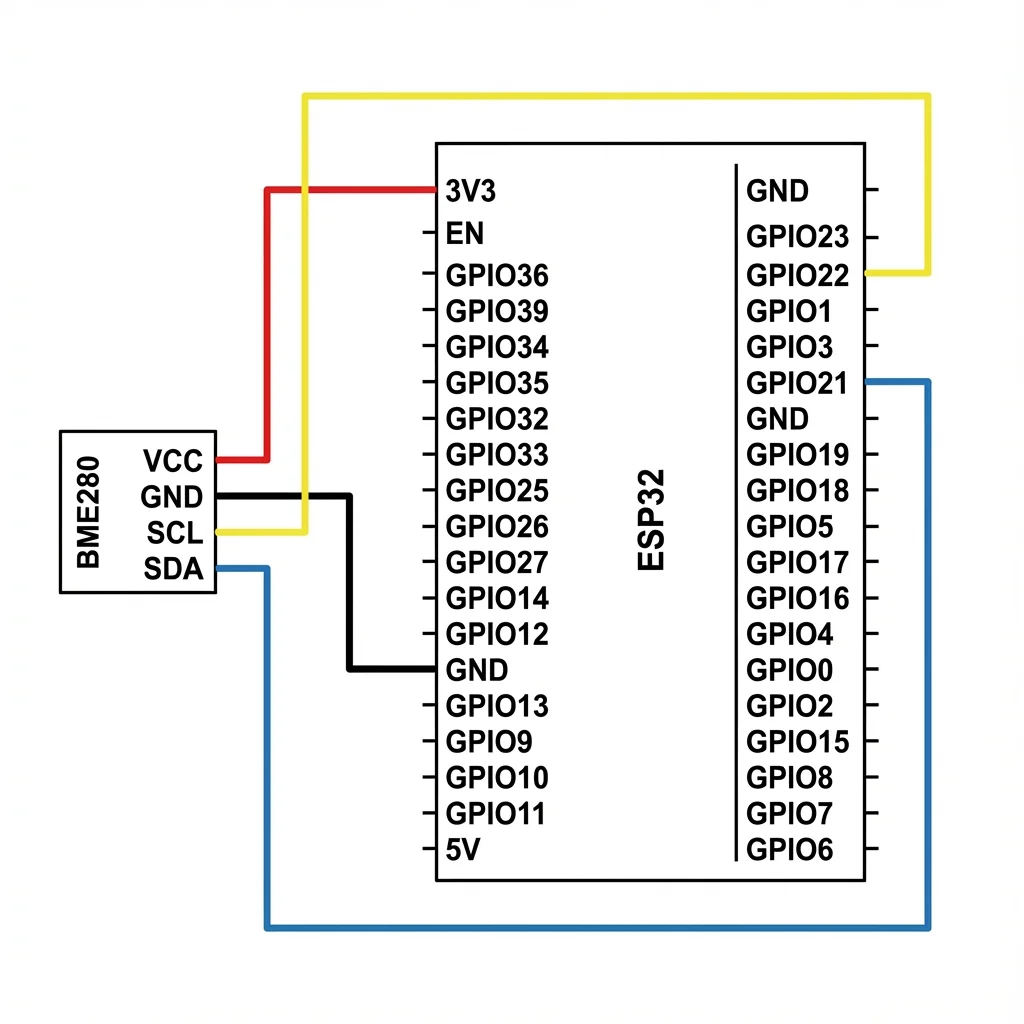
Figure 1: BME280 I2C wiring with ESP32
⚠️ I2C Address Note
The default I2C address is 0x76. If your sensor has an SDO pin and it's connected to VCC, the address changes to 0x77. Update your code accordingly.
5. Real-Life Project: Weather Station Monitor
Let's build a Weather Station Monitor that reads temperature, humidity, and pressure from the BME280, calculates altitude, and displays weather conditions.
Required Components
- ESP32 or Arduino Uno
- BME280 Sensor Module
- Jumper wires (4x)
- Breadboard (optional)
Required Libraries
Install via Arduino Library Manager:
- Adafruit BME280 Library
- Adafruit Unified Sensor (dependency)
Complete Code
#include <Wire.h>
#include <Adafruit_Sensor.h>
#include <Adafruit_BME280.h>

// ========== CONFIGURATION ==========
#define SEALEVELPRESSURE_HPA (1013.25)  // Standard sea level pressure

Adafruit_BME280 bme;  // Create BME280 object (I2C)

// ========== SETUP ==========
void setup() {
    Serial.begin(115200);
    Serial.println();
    Serial.println("========================================");
    Serial.println("   Weather Station Monitor v1.0");
    Serial.println("   BME280 Environmental Sensor");
    Serial.println("========================================");
    Serial.println();

    // Initialize BME280 at I2C address 0x76
    if (!bme.begin(0x76)) {
        Serial.println("❌ ERROR: BME280 not found!");
        Serial.println("   Check wiring or try address 0x77");
        while (1) delay(10);
    }

    Serial.println("✅ BME280 initialized successfully!");
    Serial.println();
    delay(1000);
}

// ========== MAIN LOOP ==========
void loop() {
    // Read all sensor values
    float temperature = bme.readTemperature();
    float humidity = bme.readHumidity();
    float pressure = bme.readPressure() / 100.0F;  // Convert Pa to hPa
    float altitude = bme.readAltitude(SEALEVELPRESSURE_HPA);

    // Display formatted output
    Serial.println("────────────────────────────────────────");
    Serial.print("🌡️  Temperature:  ");
    Serial.print(temperature, 1);
    Serial.print("°C  (");
    Serial.print(temperature * 9.0 / 5.0 + 32, 1);
    Serial.println("°F)");

    Serial.print("💧 Humidity:     ");
    Serial.print(humidity, 1);
    Serial.println("% RH");

    Serial.print("📊 Pressure:     ");
    Serial.print(pressure, 1);
    Serial.println(" hPa");

    Serial.print("⛰️  Altitude:     ");
    Serial.print(altitude, 1);
    Serial.println(" m");

    // Weather prediction based on pressure
    Serial.print("🌤️  Forecast:     ");
    if (pressure > 1022) {
        Serial.println("☀️ Clear skies");
    } else if (pressure > 1009) {
        Serial.println("⛅ Fair weather");
    } else if (pressure > 1000) {
        Serial.println("☁️ Cloudy");
    } else {
        Serial.println("🌧️ Rain likely");
    }

    delay(3000);  // Update every 3 seconds
}
Expected Serial Output
========================================
   Weather Station Monitor v1.0
   BME280 Environmental Sensor
========================================

✅ BME280 initialized successfully!

────────────────────────────────────────
🌡️  Temperature:  24.3°C  (75.7°F)
💧 Humidity:     48.2% RH
📊 Pressure:     1015.4 hPa
⛰️  Altitude:     18.2 m
🌤️  Forecast:     ⛅ Fair weather
6. Sensor Modes & Power Optimization
The BME280 supports different operating modes for power optimization:
| Mode | Description | Use Case |
|---|---|---|
| Sleep | No measurements, minimal power | Battery-powered standby |
| Forced | Single measurement, then sleep | Periodic readings |
| Normal | Continuous measurements | Real-time monitoring |
7. Ideas for Extension
- OLED Display: Show real-time weather data on a 0.96" OLED
- Data Logging: Store readings on SD card with timestamps
- IoT Dashboard: Send data to Blynk, ThingSpeak, or Home Assistant
- Weather Alerts: Trigger notifications on pressure drops
- Multi-floor Detection: Use pressure changes to detect floor level
8. Troubleshooting
Problem: "BME280 not found"
- Check wiring connections (especially SDA/SCL)
- Try I2C address 0x77 instead of 0x76
- Run an I2C scanner sketch to detect the sensor
Problem: Altitude readings are incorrect
- Update SEALEVELPRESSURE_HPA to your local sea level pressure
- Check local weather services for current barometric pressure
Problem: Humidity reads 0% or 100%
- Ensure you have a BME280, not BMP280 (which lacks humidity)
- Check that the sensor is not in direct sunlight or near heat sources
9. Summary
The BME280 is an excellent all-in-one environmental sensor for weather monitoring, altitude estimation, and indoor climate control. Its combination of temperature, humidity, and pressure sensing in a single low-power package makes it ideal for IoT and battery-powered applications.
- Measures temperature (±0.5°C), humidity (±3%), and pressure (±1 hPa)
- Ultra-low power consumption (3.6 µA @ 1Hz)
- Easy I2C interface with Adafruit library support
- Can estimate altitude from barometric pressure