DS18B20 Waterproof Temperature Sensor
Complete Tutorial: Precision Temperature Sensing for Wet Environments
1. Introduction
The DS18B20 is a digital temperature sensor manufactured by Maxim Integrated (formerly Dallas Semiconductor). It's famous for its waterproof probe version, making it ideal for measuring temperatures in liquids, soil, or outdoor environments.
Unlike analog temperature sensors, the DS18B20 outputs digital data using a proprietary 1-Wire protocol, which allows multiple sensors to share a single data pin!
📦 Why Choose DS18B20?
- Fully waterproof stainless steel probe
- Wide temperature range: -55°C to +125°C
- Multiple sensors on one data wire
- Each sensor has a unique 64-bit address
2. Technical Specifications
| Parameter | Specification |
|---|---|
| Operating Voltage | 3.0V – 5.5V |
| Interface | 1-Wire (single data pin) |
| Temperature Range | -55°C to +125°C |
| Accuracy | ±0.5°C (from -10°C to +85°C) |
| Resolution | 9 to 12 bits (configurable) |
| Conversion Time | 93.75ms (9-bit) to 750ms (12-bit) |
| Probe Length | ~1 meter (typical waterproof version) |
Wire Color Coding
| Wire Color | Function |
|---|---|
| Red | VCC (Power: 3.3V-5V) |
| Black | GND (Ground) |
| Yellow / White | DATA (1-Wire signal) |
⚠️ Pull-up Resistor Required
The DS18B20 requires a 4.7kΩ pull-up resistor between VCC and the DATA line for reliable communication. Many breakout modules include this resistor.
3. Wiring Guide
| DS18B20 Wire | ESP32 | Arduino Uno |
|---|---|---|
| Red (VCC) | 3.3V | 5V |
| Black (GND) | GND | GND |
| Yellow (DATA) | GPIO 4 | Pin 4 |
Important: Connect a 4.7kΩ resistor between VCC and DATA.
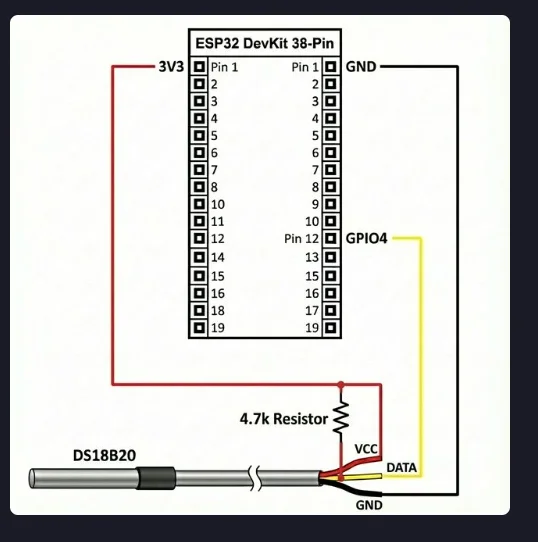
Figure 1: DS18B20 wiring with ESP32 and 4.7kΩ pull-up resistor
4. Project: Multi-Point Temperature Monitor
Build a temperature monitor that can read from multiple DS18B20 sensors on a single wire!
Required Libraries
Install via Arduino Library Manager:
- OneWire by Paul Stoffregen
- DallasTemperature by Miles Burton
Single Sensor Code
#include <OneWire.h>
#include <DallasTemperature.h>

#define ONE_WIRE_BUS 4  // Data wire connected to GPIO 4

OneWire oneWire(ONE_WIRE_BUS);
DallasTemperature sensors(&oneWire);

void setup() {
    Serial.begin(115200);
    Serial.println("DS18B20 Temperature Monitor");
    sensors.begin();

    Serial.print("Found ");
    Serial.print(sensors.getDeviceCount());
    Serial.println(" sensor(s)");
}

void loop() {
    sensors.requestTemperatures();  // Request readings from all sensors

    float tempC = sensors.getTempCByIndex(0);  // Get first sensor

    if (tempC == DEVICE_DISCONNECTED_C) {
        Serial.println("Error: Sensor disconnected!");
        delay(2000);
        return;
    }

    float tempF = tempC * 9.0 / 5.0 + 32.0;

    Serial.print("Temperature: ");
    Serial.print(tempC, 1);
    Serial.print(" C  (");
    Serial.print(tempF, 1);
    Serial.println(" F)");

    delay(2000);
}
Multiple Sensors Code
#include <OneWire.h>
#include <DallasTemperature.h>

#define ONE_WIRE_BUS 4

OneWire oneWire(ONE_WIRE_BUS);
DallasTemperature sensors(&oneWire);

int sensorCount = 0;

void setup() {
    Serial.begin(115200);
    sensors.begin();
    sensorCount = sensors.getDeviceCount();
    Serial.print("Found "); Serial.print(sensorCount);
    Serial.println(" DS18B20 sensor(s)");
}

void loop() {
    sensors.requestTemperatures();

    for (int i = 0; i < sensorCount; i++) {
        float temp = sensors.getTempCByIndex(i);
        Serial.print("Sensor "); Serial.print(i + 1);
        Serial.print(": "); Serial.print(temp, 1);
        Serial.println(" C");
    }
    Serial.println("---");
    delay(2000);
}
5. Use Cases
- Aquarium monitoring - Submerge probe in water
- Brewing/Fermentation - Monitor liquid temperatures
- Soil temperature - Gardening and agriculture
- HVAC systems - Duct and pipe monitoring
- Freezer/Fridge - Cold storage monitoring
- Weather stations - Outdoor temperature measurement
6. Troubleshooting
Sensor returns -127°C
- Check the 4.7kΩ pull-up resistor between VCC and DATA
- Verify wiring connections
- Try a different GPIO pin
Sensor not detected
- Ensure power is connected (not in parasite mode)
- Check wire color coding (varies by manufacturer)
Readings are unstable
- Use a shorter cable or add a 100nF capacitor at sensor
- Increase pull-up resistor value for long cables
7. Summary
- Waterproof digital temperature sensor (-55°C to +125°C)
- Uses 1-Wire protocol - multiple sensors on one pin
- Requires 4.7kΩ pull-up resistor between VCC and DATA
- Wire colors: Red=VCC, Black=GND, Yellow=DATA
- Libraries: OneWire + DallasTemperature