HMC5883L 3-Axis Magnetometer
Complete Tutorial: Building a Digital Compass
1. Introduction
The HMC5883L is a 3-axis magnetometer that measures magnetic field strength to determine compass heading. It's widely used in navigation systems, drones, robots, and any application that needs to know which direction is North.
The sensor detects Earth's magnetic field and outputs values for all three axes, which can be converted into a compass heading (0-360°).
⚠️ HMC5883L vs QMC5883L
Many modern modules labeled "HMC5883L" actually contain the QMC5883L clone (different I2C address: 0x0D instead of 0x1E). Check your module and use the appropriate library!
2. Technical Specifications
| Parameter | Specification |
|---|---|
| Operating Voltage | 2.16V – 3.6V (module: 3.3V – 5V) |
| Interface | I2C (up to 400kHz) |
| I2C Address | 0x1E (HMC5883L) / 0x0D (QMC5883L) |
| Field Range | ±1.3 to ±8.1 Gauss |
| Resolution | 2 milli-Gauss (12-bit) |
| Heading Accuracy | 1-2° typical |
| Output Data Rate | 0.75Hz to 75Hz |
Understanding Magnetic Declination
Magnetic North (where the compass points) differs from True North (geographic North Pole). The difference is called magnetic declination and varies by location.
To get accurate True North heading, you must add your local declination angle. Find yours at: NOAA Magnetic Declination Calculator
3. Wiring Guide
| HMC5883L Pin | Description | ESP32 | Arduino Uno |
|---|---|---|---|
| VCC | Power (3.3V) | 3.3V | 3.3V |
| GND | Ground | GND | GND |
| SCL | I2C Clock | GPIO 22 | A5 |
| SDA | I2C Data | GPIO 21 | A4 |
| DRDY | Data Ready (optional) | Any GPIO | Any Pin |
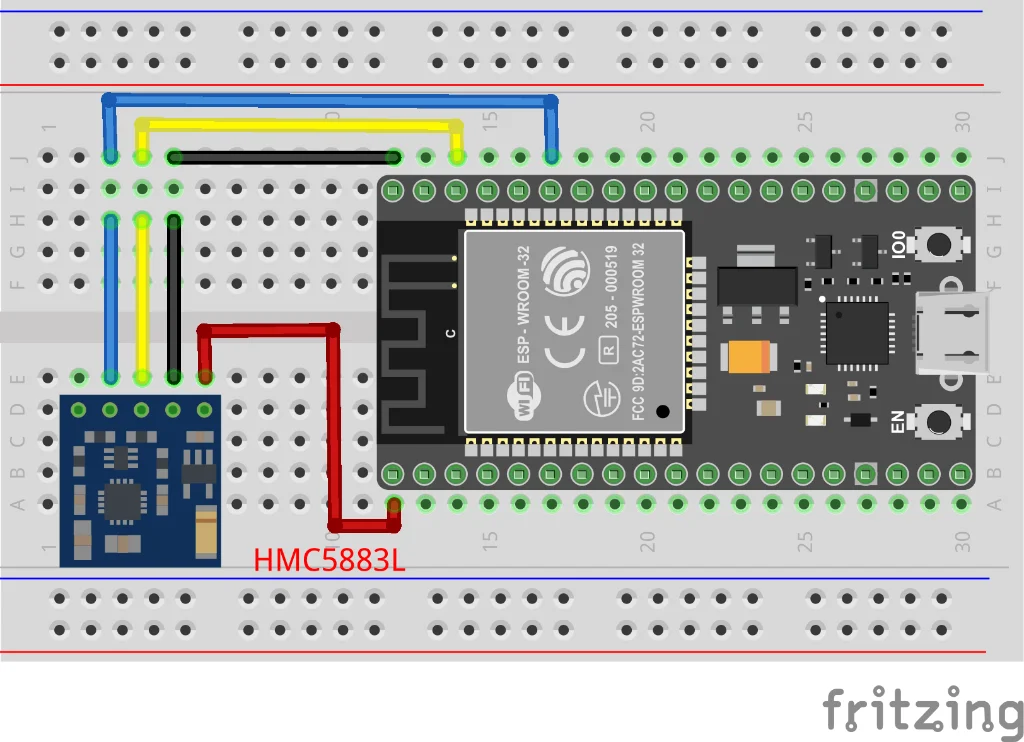
Figure 1: HMC5883L I2C wiring with ESP32
4. Project: Digital Compass
Required Library
Install Adafruit HMC5883 Unified via Arduino Library Manager.
Complete Compass Code
#include <Wire.h>
#include <Adafruit_Sensor.h>
#include <Adafruit_HMC5883_U.h>

Adafruit_HMC5883_Unified mag = Adafruit_HMC5883_Unified(12345);

// Set your local magnetic declination (in radians)
// Example: Dubai is about +2.5 degrees = 0.0436 radians
float declinationAngle = 0.0436;

void setup() {
    Serial.begin(115200);
    Serial.println("HMC5883L Digital Compass");

    if (!mag.begin()) {
        Serial.println("ERROR: HMC5883L not found!");
        Serial.println("If using QMC5883L, use different library");
        while (1);
    }

    Serial.println("Compass Ready!");
}

void loop() {
    sensors_event_t event;
    mag.getEvent(&event);

    // Calculate heading from X and Y components
    float heading = atan2(event.magnetic.y, event.magnetic.x);

    // Add magnetic declination
    heading += declinationAngle;

    // Normalize to 0-2π range
    if (heading < 0) heading += 2 * PI;
    if (heading > 2 * PI) heading -= 2 * PI;

    // Convert to degrees
    float headingDegrees = heading * 180.0 / PI;

    // Display heading with cardinal direction
    Serial.print("Heading: ");
    Serial.print(headingDegrees, 1);
    Serial.print("° - ");
    Serial.println(getCardinalDirection(headingDegrees));

    delay(250);
}

String getCardinalDirection(float heading) {
    if (heading >= 337.5 || heading < 22.5) return "N";
    if (heading >= 22.5 && heading < 67.5) return "NE";
    if (heading >= 67.5 && heading < 112.5) return "E";
    if (heading >= 112.5 && heading < 157.5) return "SE";
    if (heading >= 157.5 && heading < 202.5) return "S";
    if (heading >= 202.5 && heading < 247.5) return "SW";
    if (heading >= 247.5 && heading < 292.5) return "W";
    return "NW";
}
Expected Output
HMC5883L Digital Compass
Compass Ready!
Heading: 45.2° - NE
Heading: 44.8° - NE
Heading: 90.1° - E
Heading: 180.3° - S
5. Calibration
For accurate readings, the sensor needs calibration to compensate for nearby magnetic interference (called "hard iron" and "soft iron" distortion).
Simple Calibration Method
- Rotate the sensor slowly in a full circle
- Record the min and max values for X and Y axes
- Calculate offsets: offset = (max + min) / 2
- Subtract offsets from readings
💡 Best Practices
- Keep the sensor level during calibration
- Calibrate away from metal objects and electronics
- Recalibrate if you mount it in a new location
6. Applications
- Drone navigation: Heading hold and waypoint navigation
- Robot orientation: Autonomous navigation
- GPS enhancement: Heading when GPS course unavailable
- Augmented reality: Direction-based overlays
- Weather stations: Wind direction relative to North
7. Troubleshooting
Sensor not detected
- Check if it's actually QMC5883L (address 0x0D)
- Run I2C scanner to verify address
Heading jumps erratically
- Move away from metal objects and magnets
- Keep away from motors and speakers
- Calibrate the sensor
Reading stuck at one value
- Strong magnetic field nearby (speaker, magnet)
- Sensor may be damaged
8. Summary
- 3-axis magnetometer for compass heading
- I2C address: 0x1E (HMC5883L) or 0x0D (QMC5883L)
- Apply magnetic declination for true North
- Keep away from magnetic interference
- Calibrate for best accuracy