PIR Motion Sensor (HC-SR501)
Complete Tutorial: Motion Detection for Security & Automation
1. Introduction
The HC-SR501 is a Passive Infrared (PIR) sensor that detects motion by sensing changes in infrared radiation emitted by warm bodies (humans, animals). It's the most common motion detector used in security systems, automatic lighting, and presence detection.
"Passive" means it doesn't emit any signal—it only receives infrared radiation. This makes it low-power and undetectable.
📦 Key Features
- Detects humans up to 7 meters away
- 120° detection angle
- Adjustable sensitivity and delay time
- Digital output (HIGH/LOW)
- Very low power consumption
2. Technical Specifications
| Parameter | Specification |
|---|---|
| Operating Voltage | 4.5V – 20V DC |
| Output Voltage | 3.3V HIGH / 0V LOW |
| Detection Range | 3m – 7m (adjustable) |
| Detection Angle | ~120° |
| Delay Time | 0.3s – 18s (adjustable) |
| Trigger Modes | Repeatable (H) / Non-repeatable (L) |
| Warm-up Time | 30-60 seconds |
| Quiescent Current | < 50µA |
How PIR Sensors Work
The sensor contains two pyroelectric elements that detect infrared light. The Fresnel lens focuses IR radiation onto these elements. When a warm body moves across the sensor's field of view:
- One element sees more IR than the other
- This creates a positive differential signal
- As the body moves away, the signal reverses
- The sensor interprets this change as motion
💡 Understanding the Adjustments
Sensitivity potentiometer: Controls detection range (3m to 7m)
Time-delay potentiometer: Controls how long output stays HIGH (0.3s to 18s)
3. Trigger Modes
The jumper on the HC-SR501 selects between two trigger modes:
| Mode | Jumper Position | Behavior |
|---|---|---|
| Repeatable (H) | H position | Output stays HIGH as long as motion continues. Timer resets with each detection. |
| Non-Repeatable (L) | L position | Output goes HIGH for set delay, then goes LOW. Must wait 3s after LOW before detecting again. |
Recommended: Use Repeatable mode (H) for most applications—it provides continuous detection.
4. Wiring Guide
| HC-SR501 Pin | Description | ESP32 | Arduino Uno |
|---|---|---|---|
| VCC | Power (5-20V) | 5V (VIN) | 5V |
| OUT | Digital Output | GPIO 13 | Pin 2 |
| GND | Ground | GND | GND |
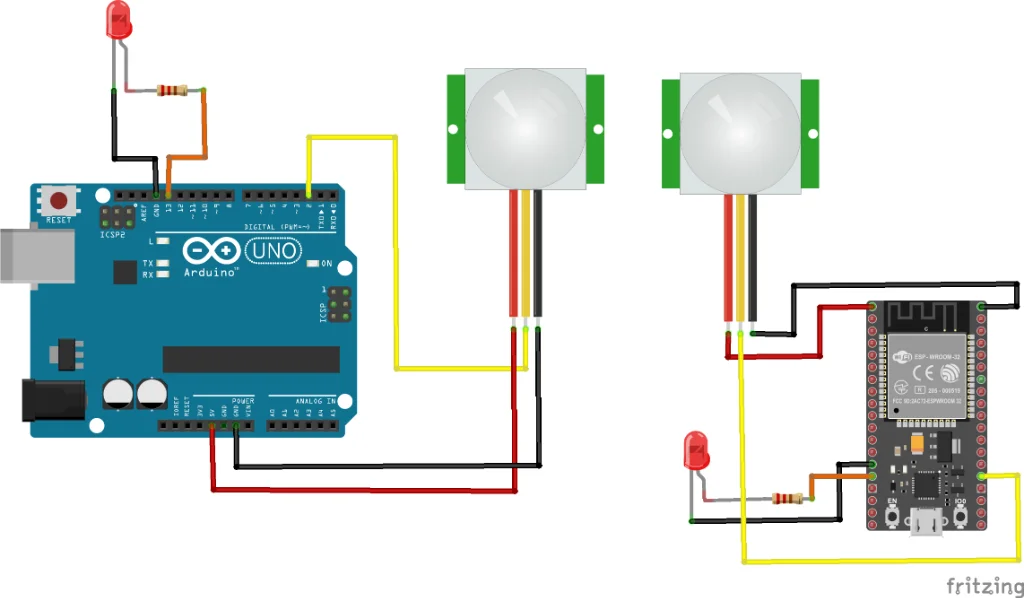
Figure 1: HC-SR501 PIR sensor wiring
⚠️ Important: Warm-Up Time
After power-on, the sensor needs 30-60 seconds to stabilize. During this time, it may give false readings. Your code should wait before trusting the output.
5. Project: Motion-Activated Alarm
Components
- ESP32 or Arduino
- HC-SR501 PIR Sensor
- LED (optional, for visual feedback)
- Buzzer (optional, for alarm)
Basic Motion Detection Code
const int pirPin = 2;     // PIR sensor output
const int ledPin = 13;    // Built-in LED

void setup() {
    Serial.begin(115200);
    pinMode(pirPin, INPUT);
    pinMode(ledPin, OUTPUT);

    Serial.println("PIR Motion Sensor");
    Serial.println("Warming up (30 seconds)...");
    delay(30000);  // Wait for sensor to stabilize
    Serial.println("Ready!");
}

void loop() {
    int motion = digitalRead(pirPin);

    if (motion == HIGH) {
        digitalWrite(ledPin, HIGH);
        Serial.println("Motion Detected!");
    } else {
        digitalWrite(ledPin, LOW);
    }

    delay(100);
}
Motion Counter with Debounce
const int pirPin = 2;
int motionCount = 0;
bool lastState = LOW;
unsigned long lastMotionTime = 0;

void setup() {
    Serial.begin(115200);
    pinMode(pirPin, INPUT);

    Serial.println("PIR Motion Counter");
    Serial.println("Warming up...");
    delay(30000);
    Serial.println("Ready! Counting motion events.");
}

void loop() {
    bool currentState = digitalRead(pirPin);

    // Detect rising edge (LOW to HIGH transition)
    if (currentState == HIGH && lastState == LOW) {
        unsigned long now = millis();

        // Debounce: count only if 2+ seconds since last
        if (now - lastMotionTime > 2000) {
            motionCount++;
            lastMotionTime = now;

            Serial.print("Motion #");
            Serial.print(motionCount);
            Serial.println(" detected!");
        }
    }

    lastState = currentState;
    delay(50);
}
6. Applications
- Security systems: Intruder detection and alarms
- Automatic lighting: Hallway, bathroom, and closet lights
- Energy saving: Turn off devices when room is empty
- Occupancy sensing: Count people, detect presence
- Smart home: Trigger automations when someone enters
- Pet doors: Detect approaching animals
7. Troubleshooting
Sensor always reads HIGH
- Wait for 60s warm-up time
- Reduce sensitivity (turn potentiometer)
- Check for heat sources in view (heaters, sunlight)
Sensor not detecting motion
- Increase sensitivity potentiometer
- Check if target is within 7m range
- Ensure subject is moving (stationary = no detection)
False triggers
- Avoid pointing at windows (sunlight changes trigger it)
- Keep away from air vents and fans
- Shield from pets if needed
8. Summary
- Detects motion by sensing infrared radiation changes
- Range: 3-7m, Angle: 120°
- Needs 30-60 second warm-up after power-on
- Digital output: 3.3V HIGH when motion detected
- Two potentiometers: sensitivity and delay time
- Use Repeatable mode (H) for continuous detection