Sharp GP2Y0A21 IR Distance Sensor
Complete Tutorial: Analog Infrared Distance Measurement
1. Introduction
The Sharp GP2Y0A21 is an analog infrared distance sensor that uses triangulation to measure distance from 10cm to 80cm. It emits an IR beam and measures the angle of the reflected light to determine distance.
Unlike ultrasonic sensors, IR sensors work well on soft materials and are not affected by sound-absorbing surfaces. They're commonly used in robotics for obstacle detection.
📦 Key Features
- Range: 10cm to 80cm
- Analog voltage output
- Fast response time
- Works on any color surface
2. Technical Specifications
| Parameter | Specification |
|---|---|
| Operating Voltage | 4.5V – 5.5V |
| Average Current | 30mA |
| Measuring Range | 10cm – 80cm |
| Output Type | Analog voltage |
| Output Voltage | ~0.4V (80cm) to ~3.1V (10cm) |
| Response Time | ~40ms |
How It Works
The sensor uses optical triangulation:
- IR LED emits a beam of infrared light
- Light reflects off the target surface
- Position Sensitive Detector (PSD) senses the angle
- Closer objects reflect light at a steeper angle
- Sensor outputs voltage proportional to angle (non-linear)
⚠️ Non-Linear Output
The voltage-to-distance relationship is NOT linear! You must use a formula or lookup table to convert voltage to distance. The voltage actually decreases as distance increases.
3. Wiring Guide
The sensor has a 3-pin JST connector:
| Wire Color | Function | Arduino | ESP32 |
|---|---|---|---|
| Red | VCC (5V) | 5V | VIN/5V |
| Black | GND | GND | GND |
| Yellow/White | Vo (Analog Out) | A0 | GPIO 34* |
*ESP32: Use ADC1 pins (GPIO 32-39). Note ESP32 ADC is 12-bit (0-4095) and 3.3V reference.
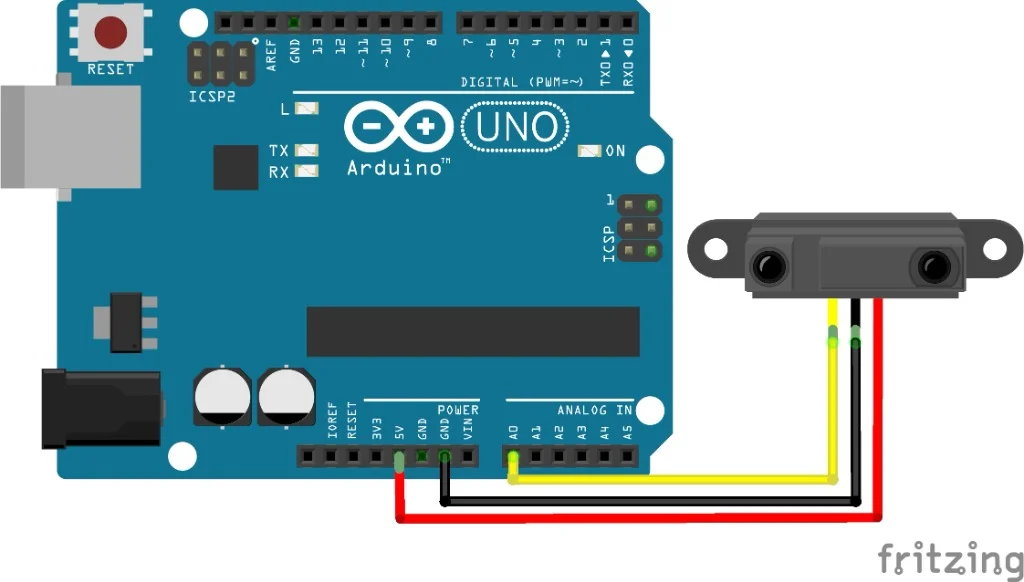
Figure 1: Sharp GP2Y0A21 wiring with Arduino
4. Project: IR Distance Meter
Arduino Code (5V, 10-bit ADC)
const int sensorPin = A0;

void setup() {
    Serial.begin(115200);
    Serial.println("Sharp IR Distance Sensor (10-80cm)");
}

void loop() {
    int rawValue = analogRead(sensorPin);
    float voltage = rawValue * (5.0 / 1023.0);

    // Empirical formula for GP2Y0A21
    // Valid for distances > 10cm
    if (voltage > 0.4) {
        float distance = 27.86 * pow(voltage, -1.15);

        // Clamp to valid range
        if (distance < 10) distance = 10;
        if (distance > 80) distance = 80;

        Serial.print("Distance: ");
        Serial.print(distance, 1);
        Serial.println(" cm");
    } else {
        Serial.println("Out of range (>80cm)");
    }

    delay(100);
}
ESP32 Code (3.3V, 12-bit ADC)
const int sensorPin = 34;  // ADC1 pin

void setup() {
    Serial.begin(115200);
    analogReadResolution(12);  // Use full 12-bit resolution
}

void loop() {
    int rawValue = analogRead(sensorPin);
    // ESP32 is 3.3V reference, but sensor outputs up to 3.1V
    float voltage = rawValue * (3.3 / 4095.0);

    if (voltage > 0.3) {
        float distance = 27.86 * pow(voltage, -1.15);
        distance = constrain(distance, 10, 80);

        Serial.print("Distance: ");
        Serial.print(distance, 1);
        Serial.println(" cm");
    } else {
        Serial.println("Out of range");
    }

    delay(100);
}
5. Improving Accuracy
Averaging Multiple Readings
float getAverageDistance(int samples) {
    float total = 0;

    for (int i = 0; i < samples; i++) {
        int raw = analogRead(sensorPin);
        float voltage = raw * (5.0 / 1023.0);
        if (voltage > 0.4) {
            total += 27.86 * pow(voltage, -1.15);
        }
        delay(10);
    }

    return total / samples;
}
Lookup Table (More Accurate)
For best accuracy, create a lookup table by measuring actual distances and recording the corresponding ADC values. Interpolate between points.
6. Applications
- Obstacle detection: Robot collision avoidance
- Edge detection: Stair/cliff detection for robots
- Proximity sensing: Touchless switches
- Object counting: Simple break-beam detection
7. Troubleshooting
Readings are erratic
- Add 10-100µF capacitor across VCC and GND
- Average multiple readings
Incorrect distance values
- Verify voltage reference (5V vs 3.3V)
- Calibrate with known distances
Minimum distance issues
- Sensor cannot measure below 10cm accurately
- Objects too close give false high readings
8. Summary
- Analog IR distance sensor (10-80cm range)
- Requires 5V power supply
- Non-linear output: use formula or lookup table
- Formula: Distance = 27.86 × Voltage^(-1.15)
- Average readings for stability