VL53L0X Time-of-Flight Laser Sensor
Complete Tutorial: Precision Laser Distance Measurement
1. Introduction
The VL53L0X is a Time-of-Flight (ToF) laser ranging sensor made by STMicroelectronics. Unlike ultrasonic sensors, it uses an invisible laser (940nm VCSEL) to measure distance with millimeter accuracy up to 2 meters.
ToF sensors measure the time it takes for light to travel to a target and back—at the speed of light! This makes them incredibly fast and accurate.
📦 Why Choose VL53L0X?
- High accuracy: ±3% typical
- Color-independent (works on any surface)
- Fast response: up to 50Hz
- Eye-safe Class 1 laser
- Tiny package and low power
2. Technical Specifications
| Parameter | Specification |
|---|---|
| Operating Voltage | 2.6V – 3.5V (module: 3.3V – 5V) |
| Interface | I2C (up to 400kHz) |
| I2C Address | 0x29 (default, changeable) |
| Measuring Range | Up to 2000mm (2 meters) |
| Accuracy | ±3% typical |
| Field of View | 25° cone |
| Laser Wavelength | 940nm (invisible infrared) |
| Current Consumption | ~20mA during ranging |
Ranging Modes
| Mode | Max Range | Speed |
|---|---|---|
| Default | 1.2m | ~30ms |
| Long Range | 2.0m | ~33ms |
| High Speed | 1.2m | ~20ms |
| High Accuracy | 1.2m | ~200ms |
💡 VL53L0X vs HC-SR04
VL53L0X: Laser, 2m range, I2C, 3.3V, color-independent
HC-SR04: Ultrasonic, 4m range, GPIO, 5V, affected by surface material
3. Wiring Guide
| VL53L0X Pin | Description | ESP32 | Arduino Uno |
|---|---|---|---|
| VIN | Power (3.3V-5V) | 3.3V | 3.3V |
| GND | Ground | GND | GND |
| SCL | I2C Clock | GPIO 22 | A5 |
| SDA | I2C Data | GPIO 21 | A4 |
| XSHUT | Shutdown (optional) | Any GPIO | Any Pin |
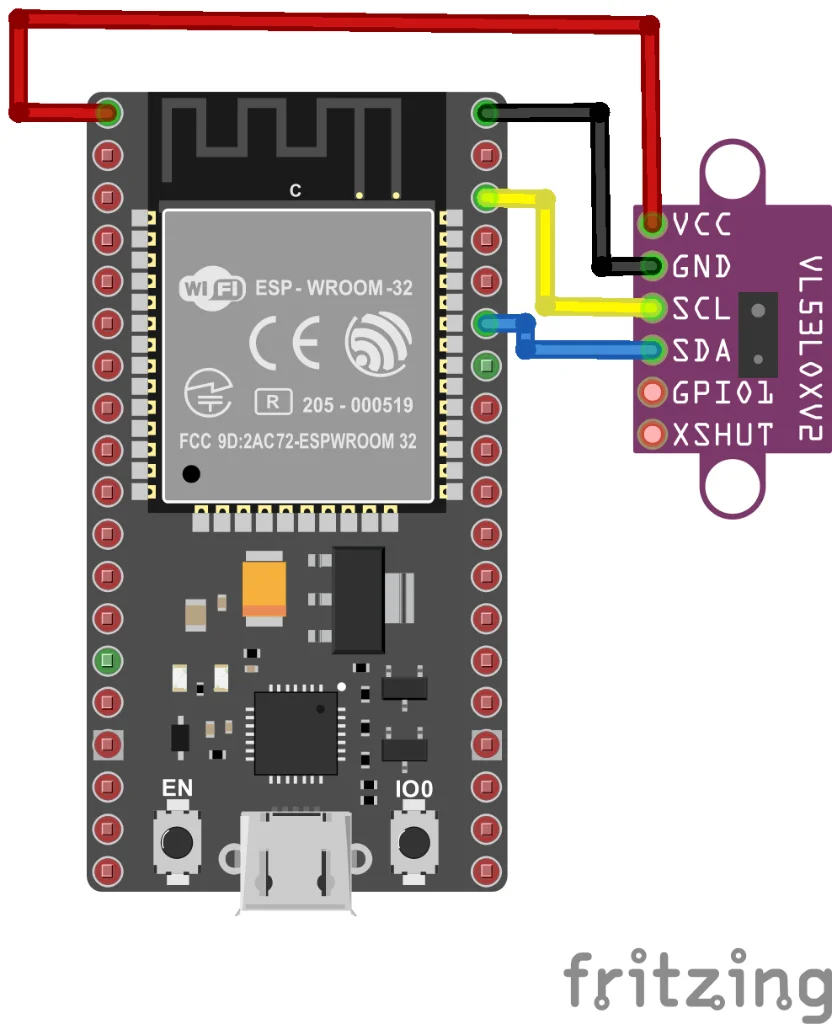
Figure 1: VL53L0X I2C wiring with ESP32
4. Project: Laser Distance Meter
Required Library
Install Adafruit VL53L0X via Arduino Library Manager.
Basic Distance Reading
#include "Adafruit_VL53L0X.h"

Adafruit_VL53L0X lox = Adafruit_VL53L0X();

void setup() {
    Serial.begin(115200);
    Serial.println("VL53L0X Laser Distance Meter");

    if (!lox.begin()) {
        Serial.println("ERROR: VL53L0X not found!");
        while (1);
    }

    Serial.println("VL53L0X Ready!");
}

void loop() {
    VL53L0X_RangingMeasurementData_t measure;
    lox.rangingTest(&measure, false);

    if (measure.RangeStatus != 4) {  // 4 = out of range
        Serial.print("Distance: ");
        Serial.print(measure.RangeMilliMeter);
        Serial.println(" mm");
    } else {
        Serial.println("Out of range");
    }

    delay(100);
}
Continuous Mode (Faster)
#include "Adafruit_VL53L0X.h"

Adafruit_VL53L0X lox = Adafruit_VL53L0X();

void setup() {
    Serial.begin(115200);

    if (!lox.begin()) {
        Serial.println("ERROR: Sensor not found!");
        while (1);
    }

    // Start continuous ranging
    lox.startRangeContinuous();
}

void loop() {
    if (lox.isRangeComplete()) {
        Serial.print("Distance: ");
        Serial.print(lox.readRange());
        Serial.println(" mm");
    }
}
5. Multiple Sensors
To use multiple VL53L0X sensors on the same I2C bus, use the XSHUT pin to change addresses:
- Connect each sensor's XSHUT to a different GPIO
- At startup, hold all XSHUT pins LOW
- Release one sensor, set its new address
- Repeat for each sensor
6. Applications
- Gesture sensing: Hand distance detection
- Autofocus: Camera focus assistance
- Robotics: Obstacle detection and navigation
- Drones: Altitude hold and landing
- 3D scanning: Simple object scanning
7. Troubleshooting
Sensor not detected
- Check I2C wiring (SDA, SCL)
- Verify I2C address with scanner (default: 0x29)
Always reads "out of range"
- Target may be too far (>2m)
- Target may be too reflective or transparent
8. Summary
- Time-of-Flight laser sensor (up to 2 meters)
- I2C interface, default address 0x29
- Color and surface independent
- Eye-safe Class 1 laser
- Use Adafruit VL53L0X library