
Have you ever encountered a ghost in your circuit? A button that seems to trigger itself, or a sensor reading that jumps randomly even when nothing is happening? In the world of digital electronics, these "ghosts" are almost always caused by Floating Pins.
To fix this, we use two simple yet vital components: Pull-Up and Pull-Down resistors. In this guide, we'll dive deep into why they are essential for your microcontrollers like ESP32 and Arduino.
1. The Problem: The Dreaded Floating State
Digital inputs are designed to detect two states: HIGH (Voltage) and LOW (Ground). However, when a pin is not connected to anything (e.g., a button is open), it isn't "zero"—it's floating.
Floating pins act like miniature antennas, picking up electromagnetic interference (EMI) from the air, nearby power lines, or even your hand. This results in the pin rapidly oscillating between HIGH and LOW, causing unpredictable behavior in your code.
💡 Pro Tip: Floating Pins
A floating pin is neither HIGH nor LOW. It is in an undefined state where even static electricity can trigger a false positive in your software.
2. The Pull-Up Resistor
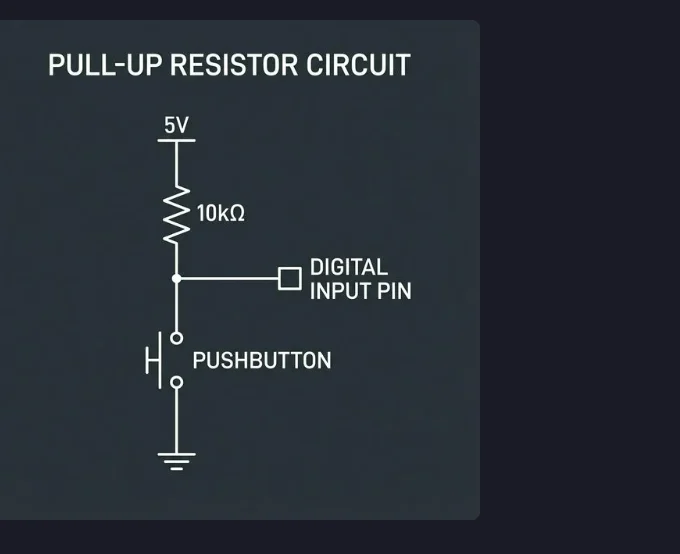
A Pull-Up resistor connects the input pin to the supply voltage (VCC). This ensures that when the switch is open, the pin is "pulled up" to a stable HIGH state.
When you press the button, the pin is connected directly to Ground, overpowering the resistor and pulling the signal LOW. This is why many buttons in electronics are Active Low.
// Pull-Up Example: Turning on an LED (Active Low)
const int buttonPin = 2; // Button connected to Pin 2 and GND
const int ledPin = 13;    // Built-in LED

void setup() {
  // Use INPUT_PULLUP to enable internal resistor (no external resistor needed!)
  pinMode(buttonPin, INPUT_PULLUP);
  pinMode(ledPin, OUTPUT);
}

void loop() {
  int state = digitalRead(buttonPin);
  // In a pull-up circuit, the pin is LOW when pressed
  if (state == LOW) {
    digitalWrite(ledPin, HIGH);
  } else {
    digitalWrite(ledPin, LOW);
  }
}
💡 Note on Internal Resistors
Both Arduino and ESP32 feature built-in Internal Pull-Up resistors. If you
use
pinMode(pin, INPUT_PULLUP) in your code, the microcontroller enables its own
internal resistor (~20kΩ to 50kΩ), meaning you do not need to add an external
resistor to your breadboard!
3. The Pull-Down Resistor
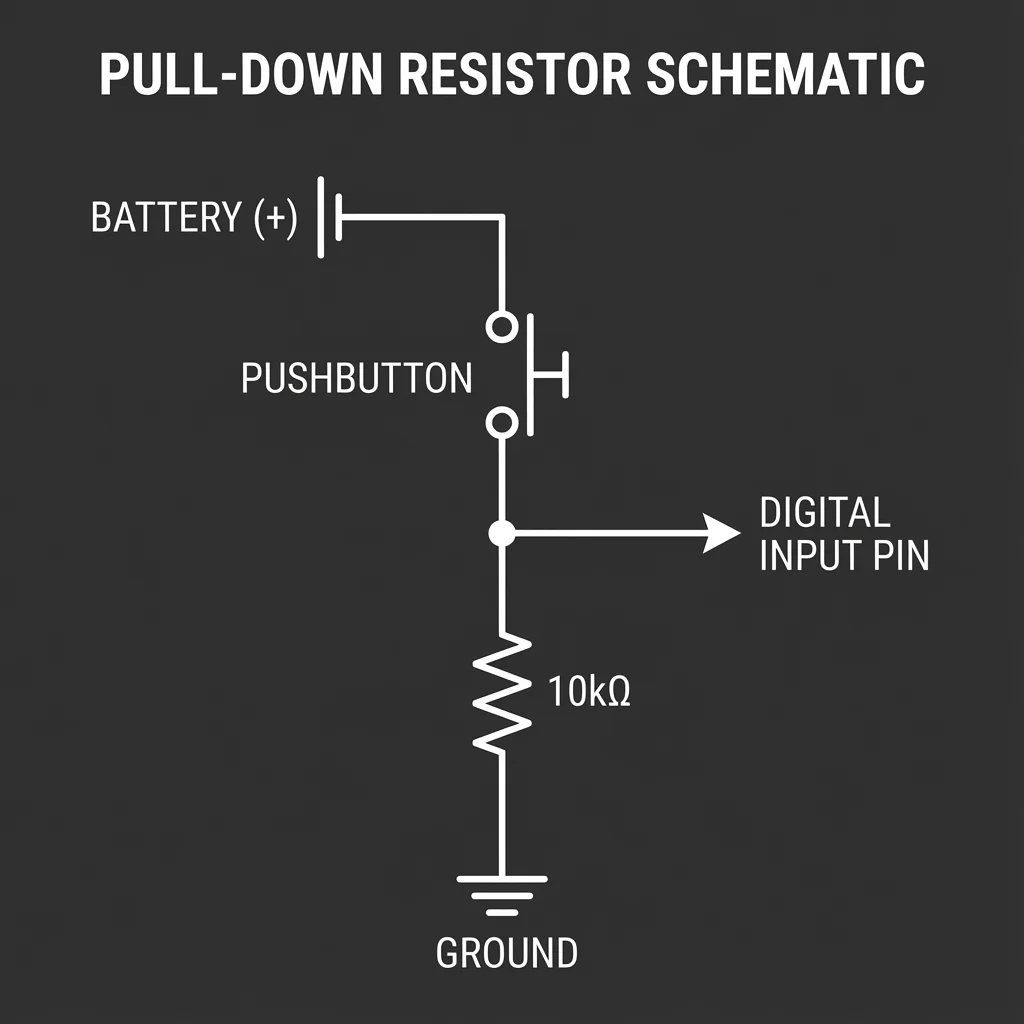
A Pull-Down resistor does the opposite: it connects the input pin to Ground (GND). This keeps the pin in a stable LOW state whenever the switch is open. When the switch is closed, it connects the pin to VCC, pulling it HIGH.
// Pull-Down Example: Turning on an LED (Active High)
const int buttonPin = 2; // Button connected to 5V and Pin 2
const int ledPin = 13;    // Built-in LED

void setup() {
  pinMode(buttonPin, INPUT); // Requires external pull-down resistor
  pinMode(ledPin, OUTPUT);
}

void loop() {
  int state = digitalRead(buttonPin);
  // In a pull-down circuit, the pin is HIGH when pressed
  if (state == HIGH) {
    digitalWrite(ledPin, HIGH);
  } else {
    digitalWrite(ledPin, LOW);
  }
}
4. Choosing the Suitable Values
Choosing the right resistor value is a balance between power consumption and noise immunity. If the value is too low, you waste power. If it's too high, the pin might still pick up noise.
| Value | Common Use Case | Pros/Cons |
|---|---|---|
| 1kΩ - 4.7kΩ | High-speed communication (I2C) | Strong pull, fast signal transitions, but higher current draw. |
| 10kΩ | Standard Buttons & Switches | The "Sweet Spot." Reliable state with very low power waste. |
| 47kΩ - 100kΩ | Battery-powered sensors | Ultra-low power, but susceptible to noise in "dirty" environments. |
5. Why it's Critical for Digital GPIOs
Microcontrollers like the ESP32 or Arduino have high-input impedance. This means they require very little current to detect a state change, which makes them incredibly sensitive to noise.
Without pull-up/pull-down resistors, the high-speed GPIO clocks can interpret noise as valid data pulses, leading to:
- Intermittent system crashes.
- False interrupts triggering.
- Incorrect sensor data interpretation.
- Significant power consumption due to constant switching.
6. ESP32 Specifics: Which Pins to Use?
On the ESP32, most GPIOs (0-33) have software-configurable internal pull-up and pull-down resistors. However, there are important exceptions:
Input-Only Pins: GPIOs 34, 35, 36, and 39 are input-only and do NOT have internal pull-up or pull-down resistors. If you use these pins, you MUST use external resistors.
For all other pins, you can easily enable them in your code:
pinMode(pin, INPUT_PULLUP);   // Enable Internal Pull-Up
pinMode(pin, INPUT_PULLDOWN); // Enable Internal Pull-Down (ESP32 only)
🚀 Summary
Always ensure your digital inputs have a defined state. Whether you use external resistors or the built-in internal pull-ups of your MCU, never leave a pin floating!